

Humans see the whole churn picture.
ChurnWin is the human dashboard for founders and SaaS teams: connect Stripe, collect cancellation feedback, watch churn and MRR trends, and decide what to fix next with the full customer context in front of you.
What humans can see
Humans get the full operating cockpit: metrics, feedback, customers, settings, and the judgement layer needed to choose the next retention move.
Every Stripe account
Switch between connected Stripe accounts or read a combined view across the SaaS portfolio you operate.
All cancellation feedback
Read every customer answer, see the reason they picked, and spot repeated complaints without digging through inboxes.
AI-ranked action plan
Turn noisy feedback into a prioritised fix-list that explains what to improve first and why it matters for revenue.
Customers and at-risk signals
See active, churned, and at-risk customers with MRR, plan, risk score, and the signals behind that risk.
Churn, MRR, and retention trends
Track voluntary churn, involuntary churn, retention, MRR movement, and response rates over time.
Email controls and templates
Control sender domains, feedback templates, billing, account settings, and the human-facing recovery loop.
Follow the revenue leak from signal to next step.
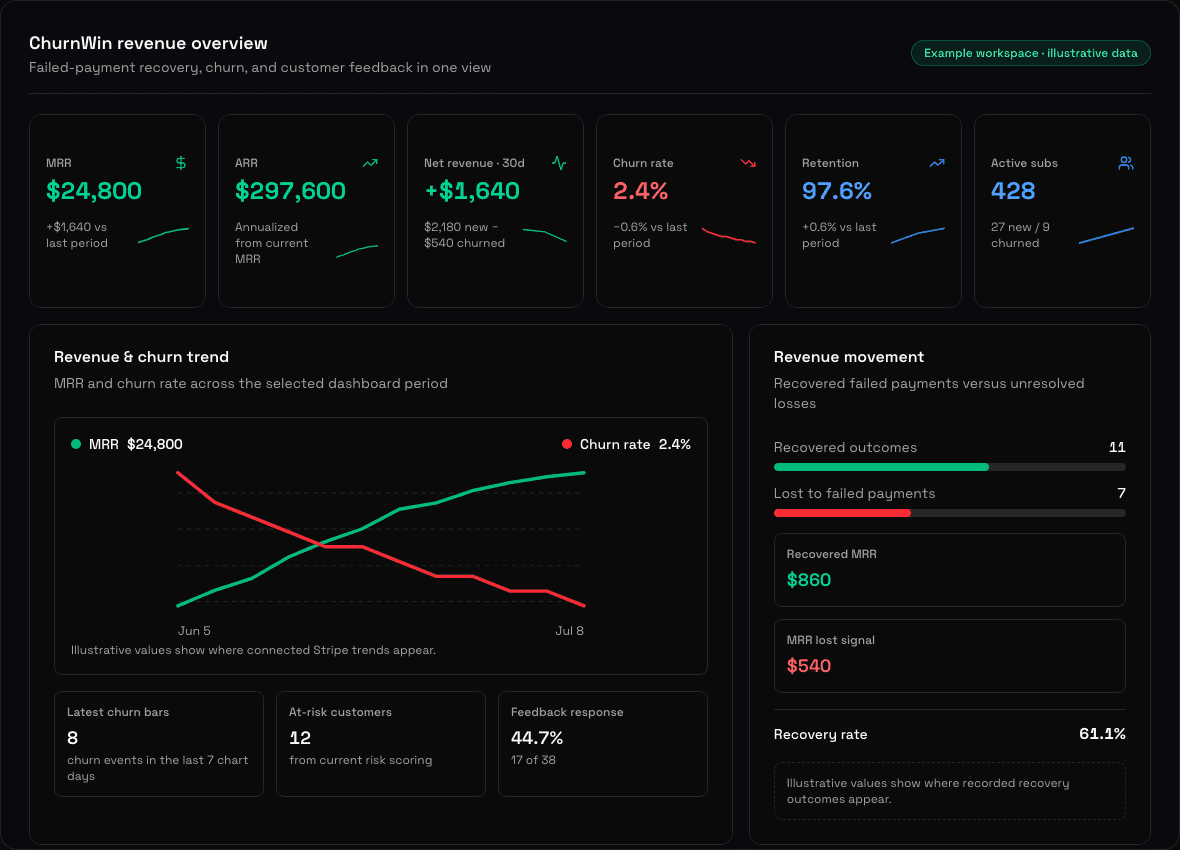
The example workspace below shows the dashboard layout with clearly labelled illustrative values. After you connect Stripe, those values are replaced by measured revenue, recovery, churn, retention, customer-risk, and feedback outcomes from the accounts you choose to connect.
- 01
Read revenue movement
Start with recovered failed payments versus unresolved losses. Recovered MRR, MRR lost, and recovery rate appear together so involuntary churn does not disappear inside one blended percentage.
- 02
Review the signal
Compare the recovery panel with churn and retention trends, active subscriptions, at-risk customers, and feedback response. Each signal is a reason to investigate, not an automatic instruction to contact or discount a customer.
- 03
Choose the next action
Turn the strongest evidence into one bounded next step: improve failed-payment recovery, investigate a repeated cancellation theme, or review an at-risk cohort. Billing and customer-outreach controls stay with your team.
Not ready to connect Stripe?
Estimate the failed-payment leak first with manual inputs and no account connection.
Turn churn into a weekly operating rhythm.
ChurnWin is built for the people who have to choose, prioritise, and ship the fix — not just stare at charts.
A founder opens ChurnWin on Monday morning and sees why revenue leaked last week.
A product manager turns top cancellation themes into roadmap issues with evidence attached.
Customer success reviews at-risk accounts before renewal calls and knows what to say.
An operator compares Stripe accounts and finds which product or plan needs retention work first.
Use the dashboard for judgement, then let agents help with analysis.
Humans can see everything, control settings, and make decisions. Agents get a safe read-only slice of that context through API and MCP so they can summarise, compare, and suggest next steps.